TinyChat15M: A Small Conversational Language Model
Building a 15-million-parameter chatbot for a tiny RISC-V board.
Large language models (LLMs) such as OpenAI’s GPT-4 and Google’s Gemini mark a major advance in artificial intelligence. Models with hundreds of billions of parameters, such as GPT-3 (175 billion) and Google’s PaLM (540 billion), handle tasks ranging from creative writing to code generation. These capabilities come at a steep price. Training GPT-3 took about 3,640 petaflop/s-days of compute and cost millions of dollars, and running it efficiently demands more than 700 GB of GPU memory.
 Meta’s AI Research SuperCluster (Photo: Meta Platforms Inc.)
The cost is environmental as well as financial. Training GPT-3 consumed 1,287 MWh of electricity and produced 502 metric tons of carbon emissions, roughly what 112 gasoline-powered cars emit in a year. Demands like these have driven interest in small language models (SLMs), which handle specific tasks with a fraction of the resources. That makes them a practical choice for mobile phones and edge devices, where memory and power are scarce.
To see how small a useful chatbot can be, I built TinyChat15M, a 15-million-parameter conversational language model based on Meta’s Llama 2 architecture. It needs only about 60 MB of free memory, and it runs on the Sipeed LicheeRV Nano W, a tiny RISC-V development board with 256 MB of DDR3 memory. Inspired by Dr. Andrej Karpathy’s llama2.c project, TinyChat15M shows that a conversational model can work well with very few resources, which makes this kind of AI cheaper, greener, and more accessible.
TinyChat: A Synthetic Dataset for Short Chat Conversations
I trained TinyChat15M on TinyChat, a synthetic dataset of one million short chat conversations written in BASIC English. BASIC is a backronym for British American Scientific International and Commercial English, a simplified form of English designed for clear communication. I generated the conversations with GPT-4o mini, a smaller and cheaper version of OpenAI’s GPT-4o, and instructed it to use mainly BASIC English words and grammar. I allowed a few words from outside BASIC English where they kept the conversations natural and coherent.
The approach follows Eldan and Li’s paper, TinyStories: How Small Can Language Models Be and Still Speak Coherent English?, which showed that small models can produce coherent text when they are trained on data with a limited vocabulary and simple sentence structures. TinyChat applies the same idea to conversation.
The linguist and philosopher Charles Kay Ogden created BASIC English as an international auxiliary language and as a tool for teaching English as a second language. He introduced it in his 1930 book, Basic English: A General Introduction with Rules and Grammar. BASIC English reduces standard English to a core vocabulary of 850 words, grouped into operations, things, picturable things, general qualities, and opposite qualities. A small set of affixes and rules extends these roots to express more ideas.
To build the prompts, I sorted these 850 words into nouns, verbs, and adjectives, following the method in the TinyStories paper. Eldan and Li used about 1,500 basic words that match the vocabulary of a typical three- to four-year-old child, grouped the same way. For each story, they randomly picked one noun, one verb, and one adjective and asked the model to use all three, which added variety to the dataset.
Combining BASIC English nouns, verbs, and adjectives gave more than eight million possible word combinations. To keep generation costs down, I randomly sampled one million of them and inserted each into the following prompt template for GPT-4o mini:
System Prompt
You are a helpful, respectful, and honest assistant. Always aim to provide the most helpful and safe answers. Your responses should not contain any harmful, unethical, racist, sexist, toxic, dangerous, or illegal content. Ensure that your answers are socially unbiased and positive. If a question does not make sense or is not factually coherent, explain why rather than providing an incorrect answer. If you do not know the answer, do not share false information. Use only BASIC English words, along with words that a typical three to four year old would understand. Follow these specific grammar rules: add es or ies to form plural nouns, ing or ed to turn verbs into adjectives, ing or er to turn verbs into nouns, ly to turn adjectives into adverbs, and er or est to compare amounts. Use un to create opposites of adjectives. Form questions by inverting the word order with do. Use normal English changes for verbs and pronouns, create compound words from two nouns or a noun and a direction, and write measures, numbers, money, days, months, years, and clock times in English words with no symbols or special characters, except for commas and periods. Do not use any punctuation marks except for commas and periods. Spell out all numbers as simple English words. Use industry specific or scientific terms as needed, such as plural, conjugation, noun, adjective, adverb, qualifier, operator, pronoun, and directive, which are necessary in language teaching but not part of BASIC English.
User Prompt
Generate a factually and logically coherent small talk conversation between a User and an Assistant, where they exchange six to ten sentences in total. Each sentence spoken by the User and the Assistant should be between ten and twenty words long. The conversation should be formatted as a single paragraph without line breaks or other textual formatting. It should begin with a
{starting}, convey a general feeling of{feeling}, and conclude with a{ending}ending. The conversation must include the noun{noun}, the verb{verb}, and the adjective{adjective}. Use the following text format:[INST]generate User’s sentence here[/INST]generate Assistant’s sentence here.
Besides the three words, each prompt set a starting tone, an overall feeling, and an ending. A conversation could open with a greeting, a question, or a suggestion; convey happiness, surprise, badness, fearfulness, anger, disgust, or sadness; and end in a conclusive, reflective, or open way. Together with the word combinations, these choices varied both the tone and the content of the conversations. To make the data compatible with Meta’s Llama 2 chat template, each User turn sits between the Llama 2 instruction tags [INST] and [/INST], followed by the Assistant’s reply. The dataset is open source and hosted on Hugging Face.
Training the TinyChat15M Small Language Model
I adapted Dr. Andrej Karpathy’s llama2.c project to build and train TinyChat15M. Its main C program, run.c, already supports chat, but a purely conversational model needed changes to both tokenization and chat behavior.
The instruction tags in TinyChat separate the turns within a conversation, but not one conversation from the next. To mark those boundaries, I added Beginning of Sequence (BOS) and End of Sequence (EOS) tokens during tokenization. Their token pieces are <s> and </s>, with token IDs 1 and 2. With these markers, the model learns where each conversation starts and ends, so it can predict and complete sentences on its own and work as a conversational model with run.c.
I also made two changes to run.c: it now handles the BOS tokens that follow a generated sentence, and it filters out instruction tags. Both changes solve the same problem. Because the model learns to generate these tags in sequence, it sometimes carries on and writes sentences that read like the User’s lines in TinyChat. The instruction tags only separate questions, suggestions, and responses, so the model cannot tell its own replies apart from the User’s. With these changes, TinyChat15M runs cleanly within the llama2.c framework.
I trained TinyChat15M on Google Colab, Google’s hosted Jupyter Notebook service, which gives access to GPUs and TPUs without any setup. Although the model is small, I trained it on an NVIDIA A100 Tensor Core GPU through Colab Pro. Training ran for 200,000 iterations and took about five hours. It produced two files: the original PyTorch checkpoint (.pt) and a llama2.c-format .bin file, which run.c uses for inference. Both are open source and available on Hugging Face.
Running TinyChat15M on the Sipeed LicheeRV Nano W
With only 256 MB of DDR3 memory, the Sipeed LicheeRV Nano W is an ideal test bed for TinyChat15M. Despite its size, the board runs Debian, an open-source Linux distribution. If the model can hold a real-time conversation here, it can be useful wherever computing power and memory are tight.
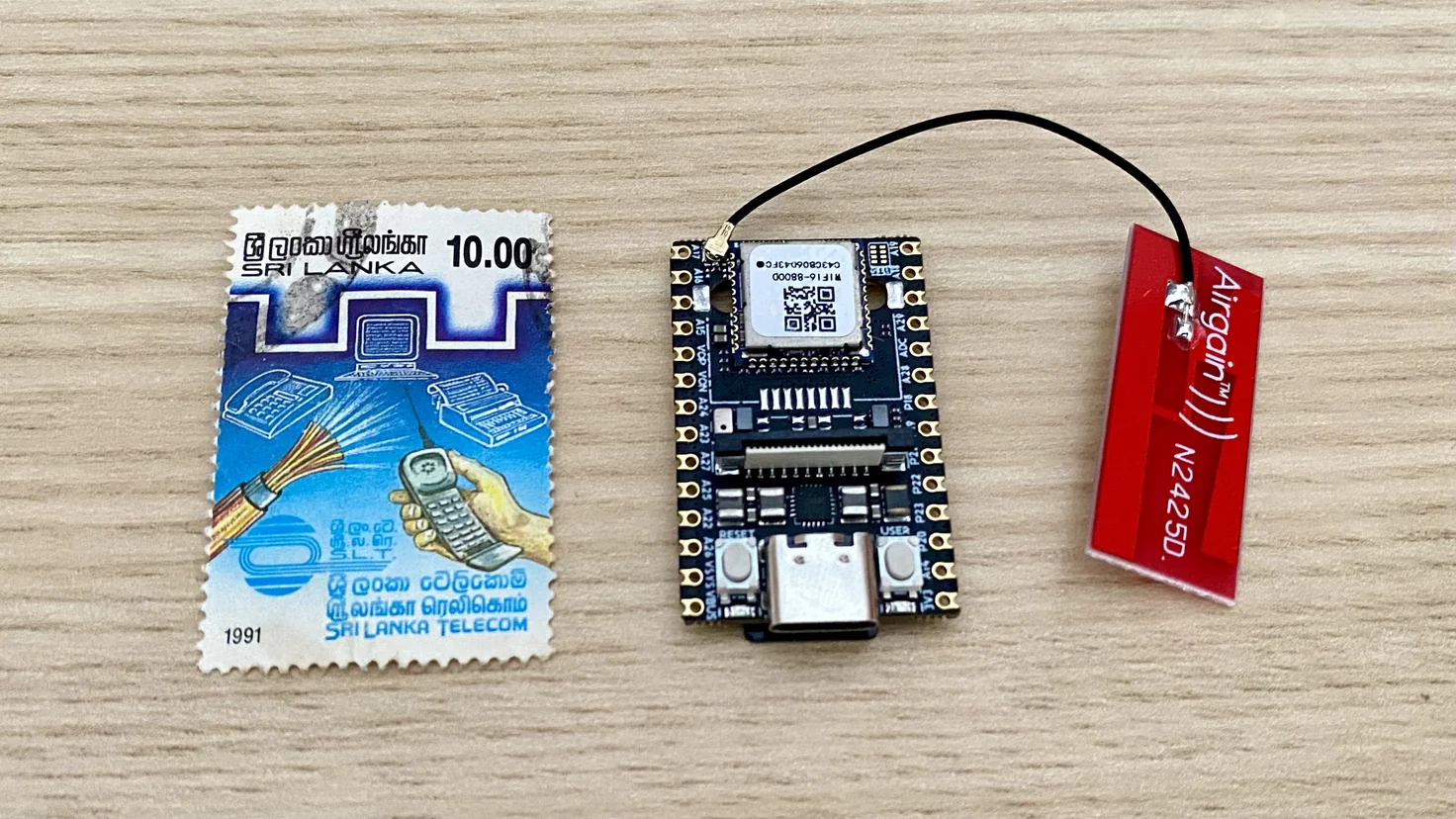 The Sipeed LicheeRV Nano W next to an old Sri Lankan stamp from my dad’s stamp collection
Across five runs, TinyChat15M generated an average of 9.40 tokens per second on the LicheeRV Nano W. In the video below, I play the User in a fictional workplace conversation with an Assistant powered by the model. With no prior context, the Assistant responds appropriately, much as a colleague might.

While the Assistant generates a reply, CPU usage reaches about 96 percent, and memory usage reaches about 27 percent of the 228 MB available, or roughly 62 MB. Even within these limits, TinyChat15M produces coherent text at a usable speed.
Small Models, Real Conversations
TinyChat15M will not replace large language models. It is built for short small talk in simple English, not for long answers or complex reasoning. But it holds a coherent conversation in about 60 MB of memory, on a board that fits in the palm of your hand, after five hours of training on a single GPU. That gap between what large models cost and what a small, focused model can do is worth exploring further.
The full project is open source. My GitHub repository has the code to generate the TinyChat dataset, train TinyChat15M, and run inference. If you have suggestions or improvements, feel free to open an issue or submit a pull request. I hope this project encourages more work on general-purpose conversational small language models, and helps make AI more affordable and accessible to everyone.